How to Design a Communication Architecture
🏯 Communication Architecture GGGHH123
What is a Communication Architecture? It is a system that defines how stakeholders of a process exchange information.
It is a heated topic today, because people know this needs to improve. Common advice you find focuses on two axes:
-
✍️ Written over Verbal communication — create more documentation and share it with stakeholders instead of transferring information in meetings.
-
⏳ Async over Sync communication — prefer async exchanges that do not block everyone's time, and structure your work in a way that you don't need instant feedback from anyone.
This is actually great advice, and you will find several instances of this approach led by successful companies — from radical ones like Doist and GitLab, to Amazon's culture of written memos, and more.
The only problem is that, in most cases, this is just tactical advice. It can improve your communication, but it is not going to fix it if it's broken.
Replacing a meeting with a shared document can be great, but what if it was the wrong meeting from the start?
So let's try to think at communication on a strategic level. For any given process we want to analyze, let's consider four elements:
-
🔍 Scope – inputs, outputs and goals of the process.
-
🏃♂️ Activities – the steps required to take inputs and transform them into outputs.
-
👥 Stakeholders – people involved and their role in the process.
-
🧱 Artifacts – given all the above, documents, tools and rituals we can setup to make communication happen properly.
Let's see them one by one 👇
🔍 Scope
You are not going to fix communication for the whole company at once. More realistically, you can take a single process and make it better.
Your company is made of multiple processes. They have overlaps and each feeds into the other, but you can also think at them in isolation, as pieces of a pipeline. A few examples might be the quarterly OKR planning, the bi-weekly development sprint, or bug reporting.
Let's take the development sprint as an example. What are its inputs and outputs? Simplifying a bit we have:
-
➡️ Input: ideas about new features
-
⬅️ Output: working software available to users
The process is successful if:
-
Things we develop actually work and are good for users
-
We are able to sustain a good pace over time
Now that we have inputs, outputs and goals, let's make a step forward and check individual activities.
🏃 Activities
Activities are the steps required to transform inputs into outputs. For a dev sprint the following happens, more or less:
-
Analysis – Data and ideas are collected. Things get prioritized and scheduled to be done.
-
Requirements – Specs are produced about each feature.
-
Design – Tech and UI design is created. This is the a plan of what needs to be done.
-
Development – Actual code is written against the specs.
-
Review – Code is reviewed and features are QAed.
-
Release – Features are released to users.
This is what needs to be done, which is largely an independent problem from who has to do it.
Being able to decouple these at a conceptual level allows you to think more clearly about responsibilities, scaling and automation.
👥 Stakeholders
I use stakeholders as a loose term to include any person involved in the process in some way. For each stakeholder, their involvement also changes based on the activity you consider.
In my opinion, the holy grail for good communication in a project is being able to map each stakeholder onto each activity, and define their role for it. If you do this right, then it's all downhill from there.
But this is also the hardest part, because it requires setting boundaries.
Sometimes, even if a person has the skills to help with something, it doesn't mean it should. You should always strive to define clear roles in order to set people's expectations correctly and create ownership.
One useful tool to reason about this is the RACI Matrix. This framework considers four major types of responsibilities for a given task:
-
🔨 Responsible – those who actually do the job. There must be at least one responsible person for each task.
-
👑 Accountable – those who ultimately sign off the job and are answerable for it. They typically provide requirements and do the final review. There is at most one accountable person for each task.
-
🤝 Consulted – those whose opinions are sought but do not work directly on the job. They might be domain experts or customers of the product.
-
📣 Informed – those who are kept up-to-date on the status of the job. Communication with them is one-way, and might happen only at the completion of the task.
A sample RACI matrix for a product dev team
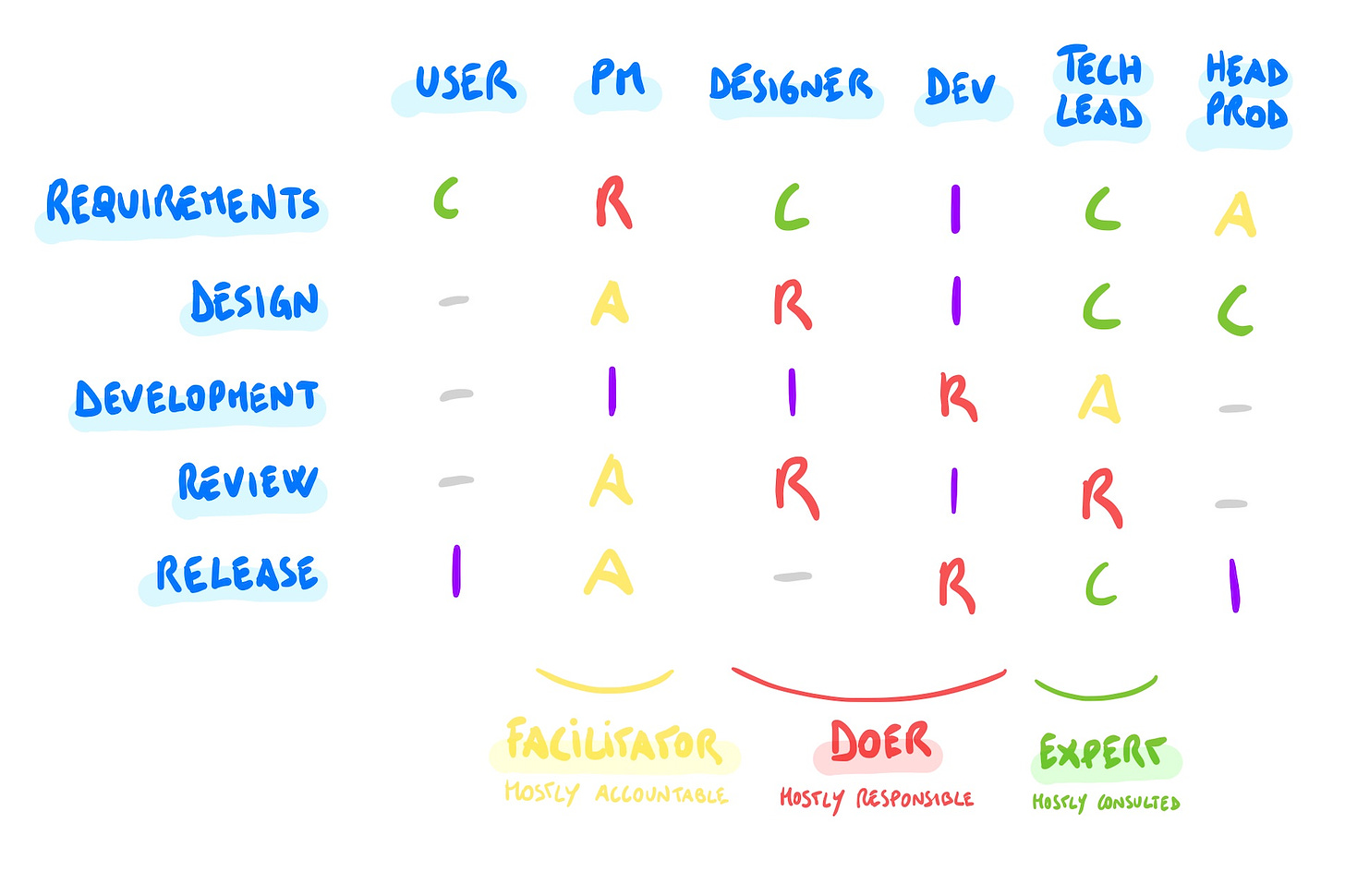
For each step of the process you should be able to fill all the RACI roles. And ideally, each role should be played by a separate person.
The latter is not always possible, especially in small teams, and that's ok. But doing this exercise is important as a reality check on the health of the process. In fact, for any missing or overlapping role you can ask yourself specific questions:
-
🚫 🔨 No Responsible – who is going to do the job?
-
🚫 👑 No Accountable – who is going to review the job?
-
🚫 🤝 No Consulted – do we really have all the info we need?
-
🚫 📣 No Informed – who cares about this?
🧱 Artifacts
Once you have a clear picture of the activities and stakeholders involved, you will have an easier time at setting up the building blocks to make things happen, like meetings, documents and tools.
This is a broad topic that would require a whole post by itself (👀), so this is some advice to start with:
-
Use meetings only for 1) urgent, 2) complex or 3) personal matters — in other words, make sure the high "bandwidth" that meetings guarantee is put to good use. Most other uses like Status Updates, Reviews, or Announcements can easily happen via documents and async communication.
-
Be aggressive in involving only the relevant people — based on their role in the activity. People should join meetings not only to receive information, but also to contribute to it. Those who are only Informed can be kept in the loop in other ways that do not block their time.
-
Don't be afraid of using multiple tools — as long as boundaries are clear, this is rarely an issue. For example, it's totally acceptable to have a project mgmt tool focused on the dev experience (e.g. Jira), and another which is more high level (e.g. Trello, or a Google Doc) to display a recap for non-technical stakeholders.
-
Display only information that is relevant to stakeholders — that is, tailor how to present things based on who will see them.